viznoir
VTK is all you need.
Cinema-quality science visualization for AI agents.
viznoir is an open-source MCP server that connects AI coding assistants to VTK-powered scientific visualization. It provides 22 tools for headless rendering, slicing, contouring, and animating CFD, FEA, and SPH simulation data — replacing manual ParaView workflows with a single prompt. Built on the Model Context Protocol, it works with Claude, Cursor, Windsurf, and any MCP-compatible client.
pip install mcp-server-viznoir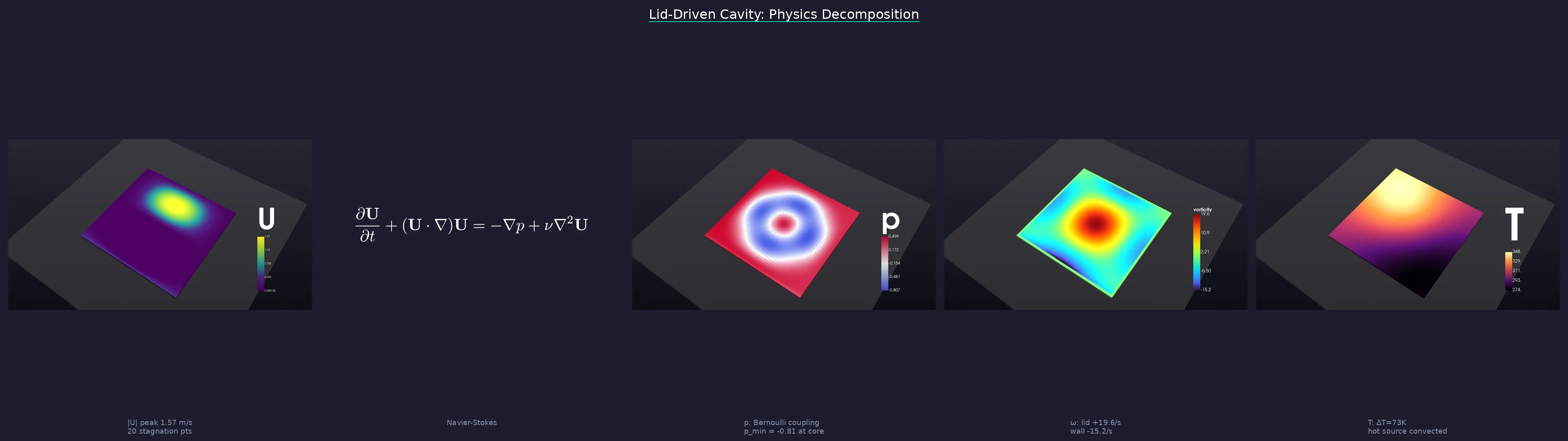
One prompt → physics analysis → cinematic renders → LaTeX → story
Architecture
FastMCP native integration
EGL/OSMesa headless · cinematic lighting · PBR
Vortex detection · stagnation points · BC parsing
Physics-driven · timeline · compositor · video
50+ input formats via VTK + meshio
10 domains, one tool
viznoir is an AI-powered MCP server for scientific visualization across engineering, medical, molecular, and geoscience domains.
CFD Post-Processing
Render pressure fields, velocity streamlines, and wall shear stress from OpenFOAM, Fluent, and CGNS cases. viznoir auto-detects CFD domains and applies appropriate colormaps and camera angles.
"Show pressure distribution on my OpenFOAM cavity case with cinematic lighting" OpenFOAM, CGNS, Fluent, pressure, velocity, streamlines, wall shear stress
FEA Visualization
Visualize von Mises stress, displacement, and mode shapes from Abaqus, Nastran, and CalculiX results. Automatic deformation scaling and yield detection.
"Render von Mises stress on the cantilever beam with deformation overlay" Abaqus, Nastran, CalculiX, stress, displacement, von Mises, mode shapes
SPH / Particle Methods
Animate DualSPHysics particle data with velocity coloring, free surface extraction, and time-series comparison. Supports .bi4 native format.
"Animate the sloshing simulation colored by velocity magnitude" DualSPHysics, SPH, sloshing, particle visualization, free surface
Medical Imaging
Volume render CT and MRI scans with clinically appropriate transfer functions. Supports VTI, DICOM, and NIfTI formats with 6 built-in presets.
"Volume render the brain phantom with bone-skin transparency preset" DICOM, NIfTI, CT scan, MRI, volume rendering, brain, organ
Molecular Visualization
Render protein structures from PDB files with ball-and-stick or surface representations. Electron density maps as isosurfaces.
"Show the hemoglobin protein structure with electron density contour" PDB, protein structure, electron density, molecular surface
Geoscience & Climate
Slice through seismic volumes, plot sea surface temperature from NetCDF, and visualize earthquake data with geographic projections.
"Slice the seismic volume at depth 2km and overlay earthquake locations" NetCDF, seismic, ocean temperature, climate, SST, earthquake
viznoir vs ParaView vs PyVista
How does viznoir compare to traditional scientific visualization tools? viznoir is the only tool purpose-built for AI agent workflows via MCP.
| Feature | viznoir | ParaView | PyVista |
|---|---|---|---|
| AI agent integration | Native MCP | pvpython scripts | Python API |
| Setup | pip install (1 line) | GUI download + Python config | pip install |
| Headless rendering | EGL built-in | pvserver + xvfb | xvfb required |
| Cinematic quality | 3-point lighting, SSAO, FXAA, PBR | OSPRay (separate) | Basic lighting |
| Domain detection | Auto (CFD/FEA/SPH) | Manual | Manual |
| Natural language | Prompt-driven | No | No |
| File formats | 50+ via VTK + meshio | 50+ native | 20+ via VTK |
| License | MIT | BSD-3 | MIT |
Get started in 3 steps
Install
One-line pip install
pip install mcp-server-viznoirOr with Claude Code:
claude install kimimgo/viznoir Configure
Add to your MCP config
{
  "mcpServers": {
    "viznoir": {
      "command": "mcp-server-viznoir"
    }
  }
}Use
Prompt in natural language
"Analyze cavity.foam, then compose
a story with LaTeX equations"Frequently asked questions
What is viznoir?
+
viznoir is an open-source MCP (Model Context Protocol) server for scientific visualization. It connects AI coding assistants like Claude, Cursor, and Windsurf to VTK-powered headless rendering, enabling engineers and researchers to generate publication-quality visualizations of simulation data through natural language prompts instead of manual GUI workflows.
What is an MCP server for scientific visualization?
+
An MCP server for scientific visualization exposes visualization tools (rendering, slicing, contouring, animation) as structured API endpoints that AI models can call directly. viznoir is currently the only MCP server purpose-built for engineering simulation post-processing, supporting CFD, FEA, SPH, medical imaging, and molecular visualization.
How does viznoir compare to ParaView?
+
ParaView is a powerful open-source visualization application with a GUI and Python scripting (pvpython). viznoir uses VTK directly (the same rendering engine as ParaView) but is designed for AI agent workflows: headless EGL rendering, MCP protocol integration, automatic domain detection, and cinematic-quality output — all without installing ParaView or running a display server.
Does viznoir replace VTK or ParaView?
+
No. viznoir is built on VTK and provides an AI-friendly interface to VTK capabilities. It complements ParaView for automated, headless, AI-driven post-processing workflows. For interactive exploration, ParaView remains the standard. For batch processing and AI-driven analysis, viznoir adds prompt-based control.
What simulation formats does viznoir support?
+
viznoir supports 50+ file formats through VTK and meshio: OpenFOAM (.foam), CGNS, Fluent (.cas/.msh), Abaqus (.inp), Nastran (.bdf/.op2), DualSPHysics (.bi4), VTK/VTU/VTP, STL, OBJ, PLY, glTF, DICOM, NIfTI, NetCDF, PDB, and more. It auto-detects the simulation domain (CFD, FEA, SPH) and applies appropriate visualization settings.
Can viznoir do CFD post-processing?
+
Yes. viznoir provides specialized CFD post-processing capabilities: pressure and velocity field rendering, streamline visualization, wall shear stress mapping, boundary layer analysis, and vortex detection. It reads OpenFOAM, CGNS, and Fluent cases directly and auto-detects CFD-specific fields like p, U, k, epsilon, and nut.
How does viznoir handle headless rendering?
+
viznoir uses VTK with EGL (GPU) or OSMesa (CPU) for fully headless rendering — no X server, no display, no GUI needed. This makes it ideal for servers, CI/CD pipelines, Docker containers, and AI agent environments. A singleton render window is reused across requests and automatically recycled every 100 renders to prevent GPU memory leaks.
What AI assistants work with viznoir?
+
viznoir works with any MCP-compatible AI client: Claude Code, Claude Desktop, Cursor, Windsurf, Gemini CLI, and others. It exposes 22 tools through the standard Model Context Protocol, so any client that supports MCP can use viznoir for scientific visualization.